PAI
Vercel Security Checkpoint
mcpmarket.comConnect Claude Code to your Cua sandboxes:
claude mcp add cua-mcp -- cua serve-mcpVerify the connection:
claude mcp list
Before explaining what Clawdbot is, here’s what people are doing with it:
$4,200 car discount: AJ Stuyvenberg had his bot orchestrate a bidding war between dealerships. The bot negotiated via text while he watched. Full breakdown here.
Insurance fight: Someone’s bot accidentally started a dispute with their insurance company, leading to case reinvestigation
180 million tokens: Federico Viticci (MacStories) burned through 180M tokens in roughly a week of experimenting
Nokia development: A user claimed they’re “literally building a whole website on a Nokia 3310” by texting their bot instructions
Mac Mini phenomenon: Multiple people bought Mac Minis specifically to run it 24/7
Architecture
Local Vault ↔ rclone ↔ S3 → EventBridge → Lambda → Bedrock
│ │
└────────────────────┴──→ DynamoDB
│
Agent Outputs ← rclone ←────────────────────────┘
AWS Services Used:
S3: Vault storage (source of truth)
DynamoDB: Metadata and entity index
Lambda: 6 serverless functions for processing
Bedrock: Claude 3 models for AI capabilities
EventBridge:... See more
Local Vault ↔ rclone ↔ S3 → EventBridge → Lambda → Bedrock
│ │
└────────────────────┴──→ DynamoDB
│
Agent Outputs ← rclone ←────────────────────────┘
AWS Services Used:
S3: Vault storage (source of truth)
DynamoDB: Metadata and entity index
Lambda: 6 serverless functions for processing
Bedrock: Claude 3 models for AI capabilities
EventBridge:... See more
Features
Automatic Classification:Categorizes documents as meetings, ideas, references, journals, or projects
Entity Extraction: Identifies people, organizations, concepts, and locations
Daily Summaries: Generates concise summaries of each day's activity (runs at 6 AM UTC)
Weekly Reports: Creates comprehensive weekly reviews with themes and follow-ups
Bidirectional Sync: Seamlessly syncs between local vault and AWS S3
Obsidian Compatible: Works with standard Obsidian vault structure
Cost Effective: ~$15-20/month for typical usage (50-100 docs/month)
GitHub - spaceba-by/pkm: pkm management.
github.com
eric's project
Clawdbot Showed Me What the Future of Personal AI Assistants Looks Like
Federico Viticcimacstories.netTo say that Clawdbot has fundamentally altered my perspective of what it means to have an intelligent, personal AI assistant in 2026 would be an understatement. I’ve been playing around with Clawdbot so much, I’ve burned through 180 million tokens on the Anthropic API (yikes), and I’ve had fewer and fewer conversations with the “regular” Claude and ChatGPT apps in the process. Don’t get me wrong: Clawdbot is a nerdy project, a tinkerer’s laboratory that is not poised to overtake the popularity of consumer LLMs any time soon. Still, Clawdbot points at a fascinating future for digital assistants, and it’s exactly the kind of bleeding-edge project that MacStories readers will appreciate.
Clawdbot can be overwhelming at first, so I’ll try my best to explain what it is and why it’s so exciting and fun to play around with. Clawdbot is, at a high level, two things:
An LLM-powered agent that runs on your computer and can use many of the popular models such as Claude, Gemini, etc.
A “gateway” that lets you talk to the agent using the messaging app of your choice, including iMessage, Telegram, WhatsApp and others.
The second aspect was immediately fascinating to me: instead of having to install yet another app, Clawdbot’s integration with multiple messaging services meant I could use it in an app I was already familiar with. Plus, having an assistant live in Messages or Telegram further contributes to the feeling that you’re sending requests to an actual assistant.
The “agent” part of Clawdbot is key, however. Clawdbot runs entirely on your computer, locally, and keeps its settings, preferences, user memories, and other instructions as literal folders and Markdown documents on your machine. Think of it as the equivalent of Obsidian: while there is a cloud service behind it (for Obsidian, it’s Sync; for Clawdbot, it’s the LLM provider you choose), everything else runs locally, on-device, and can be directly controlled and infinitely tweaked by you, either manually, or by asking Clawdbot to change a specific aspect of itself to suit your needs.
My local Clawdbot setup. It’s just folders and some Markdown files.
The Last Algorithm
danielmiessler.com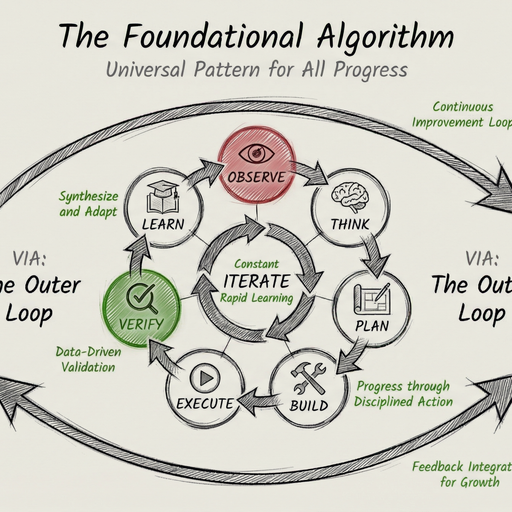
Here's what each MCP server does:
• playwright - Browser automation for testing and debugging web apps (runs locally via bunx)
• httpx - Gets tech stack information and web server details from any website
• content - Searches my entire blog archive and writing history to find past opinions and posts
• daemon - My personal life API with preferences,
danielmiessler.com • Building a Personal AI Infrastructure
📥 Context Loading Hooks:
• submit-user-hook - Loads context by intent
• load-dynamic-requirements - Smart routing
• Automatic agent selection
• Domain-specific knowledge injection
🔧 Integration Hooks:
• Pre/post command execution
• Error handling and recovery
• Rate limiting and validation
• Security scanning